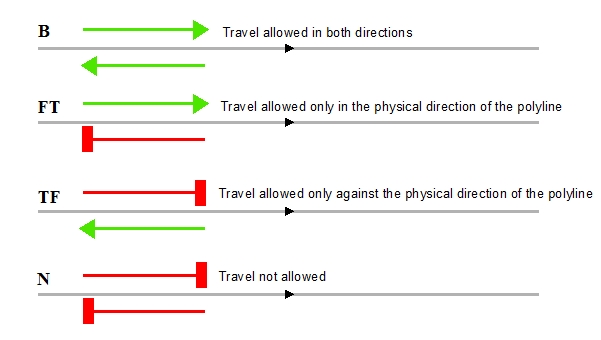

Creates from a polyline dataset a Biderectional Network. This is a network in which any direction of travel is allowed. This might be restricted for specific edges by the attributes in the "Direction" field in the attribute table of the input dataset.
Parameters
| Expression | Explanation |
|---|---|
| Function Name | BuildBidirectionalNetwork |
| <input dataset> | A String representing the input layer. Must be of Polyline type. |
| <output network> | A String - the full name of the output network file. |
| {Direction Field} | A String representing the Name of the field defining the Direction.
If not specified travel in both directions will be set for all edges. Valid values:
|
| {From Level Field} | A String representing the Name of the field defining the elevation of the FROM Node of the polylines. If not specified a level of 1 will be set for the FROM Nodes of all edges. |
| {To Level Field} | A String representing the Name of the field defining the elevation of the TO Node of the polylines. If not specified a level of 1 will be set for the TO Nodes of all edges. |
| {FromTo Cost Field} | A String representing the Name of the field defining the cost of the edge for each polyline in the direction of the polyline. If not specified the cost for all edges will be the length of the corresponding polylines. |
| {ToFrom Cost Field} | A String representing the Name of the field defining the cost of the edge for each polyline against the direction of the polyline. If not specified the cost for all edges will be the length of the corresponding polylines. |
ETGWPath used in the table below is the full path to ETGWRun.exe (E.G. "C:\Program Files\ETSpatial Techniques\ETGeo Wizards\ETGWRun.exe")
| Language | Syntax |
|---|---|
| Python | subprocess.call([ETGWPath, "BuildBidirectionalNetwork", "input dataset", "output network", "Direction Field", "From Level Field" "To Level Field" "FromTo Cost Field" "ToFrom Cost Field"]) |
| .NET using ETGWRun.exe | StartInfo.FileName = ETGWPath StartInfo.Arguments = "BuildBidirectionalNetwork" "input dataset" "output network" "Direction Field" "From Level Field" "To Level Field" "FromTo Cost Field" "ToFrom Cost Field" |
| .NET using ETGWOutX.dll | BuildBidirectionalNetwork(input dataset, output network, Direction Field, From Level Field,To Level Field, FromTo Cost Field, ToFrom Cost Field) |
| ArcPy | arcpy.BuildBidirectionalNetwork(input dataset, output network, "Direction Field", "From Level Field", "To Level Field", "FromTo Cost Field", "ToFrom Cost Field") |
Notes:
<> - required parameter
{} - optional parameter
The argument separator for StartInfo.Arguments is space. If a string might contain a space, you need to double quote it.