Creates a bounding rectangle from each feature in the input feature class. Three ways to align the rectangles are available. Attributes of the original features are transferred to the resulting polygons.
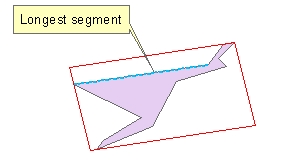
Bounding rectangle aligned with the longest segment of the boundary of the input polygon
Bounding rectangle aligned with the longest axis of the boundary of the input polygon

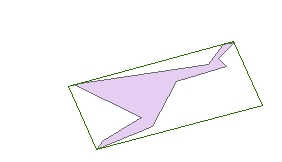
Minimum area bounding rectangle
Parameters
| Expression | Explanation |
|---|---|
| Function Name | FeaturesToRectangles |
| <input dataset> | A String representing the input layer. |
| <output dataset> | A String - the full name of the output layer. |
| {Alignment} | A String defining the orientation of the rectangles to be created
|
ETGWPath used in the table below is the full path to ETGWRun.exe (E.G. "C:\Program Files\ETSpatial Techniques\ETGeo Wizards\ETGWRun.exe")
| Language | Syntax |
|---|---|
| Python | subprocess.call([ETGWPath, "FeaturesToRectangles", "input dataset", "output dataset", "Alignment"]) |
| .NET using ETGWRun.exe | StartInfo.FileName = ETGWPath StartInfo.Arguments = "FeaturesToRectangles" "input dataset" "output dataset" "Alignment" |
| .NET using ETGWOutX.dll | FeaturesToRectangles(input dataset, output dataset,Alignment) |
| ArcPy | arcpy.FeaturesToRectangles(input dataset, output dataset,Alignment) |
Notes:
<> - required parameter
{} - optional parameter
The argument separator for StartInfo.Arguments is space. If a string might contain a space, you need to double quote it.