
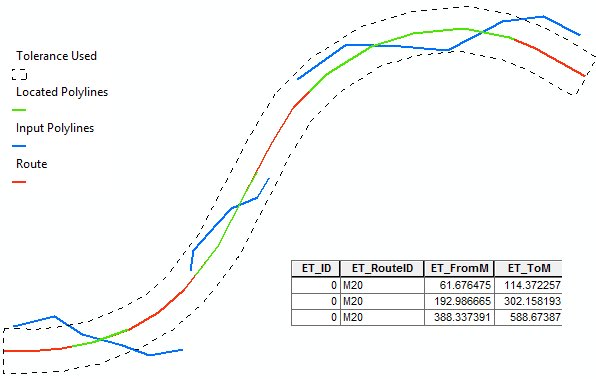

Creates an event layer (table) from the input route dataset and a feature layer.
Parameters
| Expression | Explanation |
|---|---|
| Function Name | LocateFeaturesAlongRoutes |
| <input dataset> | A feature layer. Must be of Point, Polyline or Polygon type. |
| <Route Layer> | A String - feature layer. Must be of PolylineM type. |
| <output dataset> | A String - the full name of the output layer. |
| <Route Key Field> | A String - the name of the route ID field in the route dataset |
| {Search Tolerance} | A Double - the search tolerance (for Point or Polyline input datasets). For Polygons use 0 |
| {Otput Table} | A Boolean - if TRUE only event table will be stored, if FALSE a feature layer will be saved. |
| {Add Atributes} | A Boolean - if TRUE the attributes of the input dataset will be copied to the result. |
ETGWPath used in the table below is the full path to ETGWRun.exe (E.G. "C:\Program Files\ETSpatial Techniques\ETGeo Wizards\ETGWRun.exe")
| Language | Syntax |
|---|---|
| Python | subprocess.call([ETGWPath, "LocateFeaturesAlongRoutes", "input dataset", "Route Layer", "output dataset", "Route Key Field", "Search Tolerance", "Otput Table", "Add Atributes"]) |
| .NET using ETGWRun.exe | StartInfo.FileName = ETGWPath StartInfo.Arguments = "LocateFeaturesAlongRoutes" "input dataset" "Route Layer" "output dataset" "Route Key Field" "Search Tolerance" "Otput Table" "Add Atributes" |
| .NET using ETGWOutX.dll | LocateFeaturesAlongRoutes(input dataset, Route Layer, output dataset, Route Key Field, Search Tolerance, Otput Table, Add Atributes) |
| ArcPy | arcpy.LocateFeaturesAlongRoutes(input dataset, Route Layer, "output dataset", "Route Key Field", "Search Tolerance", "Otput Table", "Add Atributes") |
Notes:
<> - required parameter
{} - optional parameter
The argument separator for StartInfo.Arguments is space. If a string might contain a space, you need to double quote it.