Delineates streams from a Flow Accumulation raster by applying a Stream Initiation threshold.
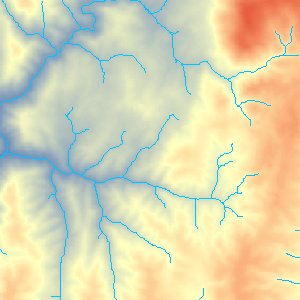
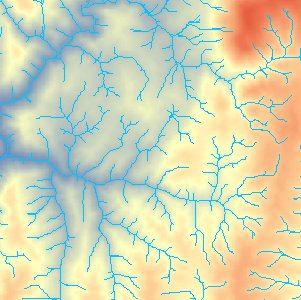
An example of Create Stream Raster output. The first image shows the output at Threshold value of 1000 cells and the second at Threshold value of 100 cells.
Parameters
| Expression | Explanation |
|---|---|
| Function Name | CreateStreamRaster |
| <input raster> | A String representing the input DEM raster dataset. |
| <output raster> | A String - the full name of the output raster. |
| {Stream Initiation Threshold} | A Double representing the Threshold value. |
ETSPath used in the table below is the full path to ETSRun.exe (E.G. "C:\Program Files\ETSpatial Techniques\ETSurface\ETSRun.exe")
| Language | Syntax |
|---|---|
| Python | subprocess.call([ETSPath, "CreateStreamRaster", "input raster", "output raster", "Stream Initiation Threshold"]) |
| .NET using ETSRun.exe | StartInfo.FileName = ETSPath StartInfo.Arguments = "CreateStreamRaster" "input raster" "output raster" "Stream Initiation Threshold" |
| .NET using ETSOutX.dll | CreateStreamRaster(input raster, output raster, Stream Initiation Threshold) |
| ArcPy | arcpy.CreateStreamRaster("input raster", "output raster", "Stream Initiation Threshold") |
Notes: