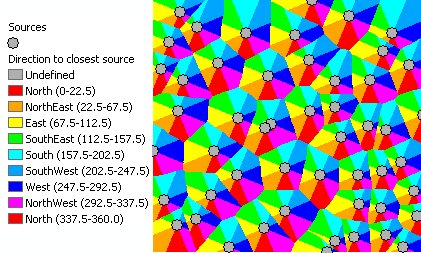
Calculates for each cell of the output raster the direction to the closest point (source) of the input feature class. If the input feature class is of Polyline or Polygon type, the vertices will be used as sources..
Parameters
| Expression | Explanation |
|---|---|
| Function Name | EucledeanDirection |
| <InputFeatures> | A String - the full path to the input feature dataset. |
| <output raster> | A String - the full name of the output raster. |
| <CellSize> | A Double representing the cell size of the output raster. |
ETSPath used in the table below is the full path to ETSRun.exe (E.G. "C:\Program Files\ETSpatial Techniques\ETSurface\ETSRun.exe")
| Language | Syntax |
|---|---|
| Python | subprocess.call([ETSPath, "EucledeanDirection", "InputFeatures", "output raster", "CellSize"]) |
| .NET using ETSRun.exe | StartInfo.FileName = ETSPath StartInfo.Arguments = "EucledeanDirection" "InputFeatures" "output raster" "CellSize" |
| .NET using ETSOutX.dll | EucledeanDirection(InputFeatures, output raster, CellSize) |
| ArcPy | arcpy.EucledeanDirection("InputFeatures", "output raster", "CellSize") |
Notes: