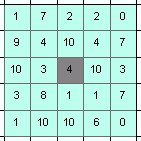
- Width = 3
- Width = 5

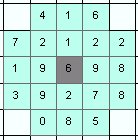
- Diameter = 3
- Diameter = 5

Analyses the values of a raster within user defined neighborhood around each point of the input point dataset. Calculates statistics for each point and adds them in the attribute table of the output.
Neighborhoods (the grey cell is the cell in which the point is located):
Parameters
| Expression | Explanation |
|---|---|
| Function Name | PointStatistics |
| <InputPoints> | A String - full path to the Input Point dataset. |
| <OutputPoints> | A String - the full path to the output point layer. |
| <InputRaster> | A String - full path to the input raster dataset. |
| <NeighborhoodType> | A String - the neighborhood type. Valid values: Square and Circle. |
| <NeighborhoodSize> | An integer - the side of the square or the diameter of the circle in pixels/number of cells. This should be an odd number. |
| {Prefix} | A String (maximum 3 characters) representing the prefix. See description above. |
ETSPath used in the table below is the full path to ETSRun.exe (E.G. "C:\Program Files\ETSpatial Techniques\ETSurface\ETSRun.exe")
| Language | Syntax |
|---|---|
| Python | subprocess.call([ETSPath, "PointStatistics", "InputPoints", "OutputPoints", "InputRaster", "NeighborhoodType", "NeighborhoodSize", "Prefix"]) |
| .NET using ETSRun.exe | StartInfo.FileName = ETSPath StartInfo.Arguments = "PointStatistics" "InputPoints" "OutputPoints" "InputRaster" "NeighborhoodType" "NeighborhoodSize" "Prefix" |
| .NET using ETSOutX.dll | PointStatistics(InputPoints, OutputPoints, InputRaster, NeighborhoodType, NeighborhoodSize, Prefix) |
| ArcPy | arcpy.PointStatistics("InputPoints", "OutputPoints", "InputRaster", "NeighborhoodType", "NeighborhoodSize", "Prefix") |
Notes: