Surface curvature at a point is the
curvature of a line formed by the intersection of the surface with a plane
with a specific orientation passing through this point. The value of the
curvature is reciprocal of the radius of the curve - the larger the radius,
the smaller the curvature value (a gentle curve has small curvature and a
tight curve has large curvature value). The units of the curvature are
radians per linear unit (the unit of the spatial reference of the raster).
Because the values of the curvature are typically small, the results of
the curvature functions of ET Surface are the actual curvature multiplied by
100. So the value of the curvature can be described as the change of the
orientation resulting from travelling one hundred linear units along the
respective line.
The sign of the curvature is assigned differently by
different authors. To keep consistency with ArcGIS the functions of ET
Surface assign the sign as the corresponding functions of ArcGIS. If you
want to change the sign you can use the
Raster Calculator to multiply the result by -1.
The functions of
ET Surface calculate the curvatures for each cell of a raster dataset using
its immediate neighbors as devised by Zevenbergen and Thorne (1987).
Plan Curvature is the curvature in a horizontal plane. It can be also described as the curvature of the hypothetical contour line that passes through a specific cell. The Plan Curvature is positive for cells with concave contours and negative for cells with convex contours. Plan curvature can be used to differentiate between ridges and valleys.
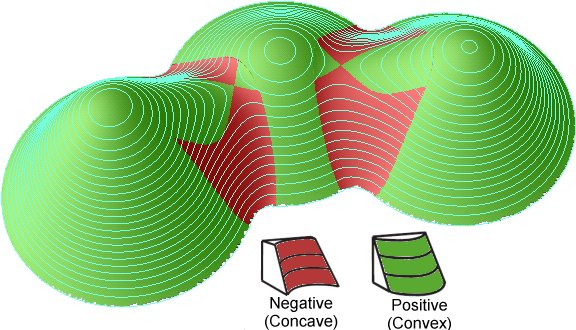
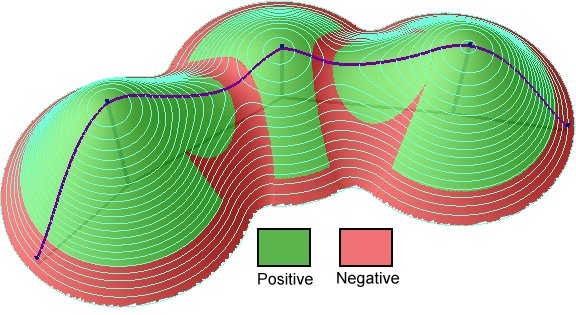
Profile Curvature is the curvature of the surface in the direction of the steepest slope (in the vertical plane of a flow line). The Profile Curvature affects the flow velocity of water draining the surface and influences erosion and deposition. In locations with convex(negative) Profile Curvature the erosion will prevail and in locations with concave (positive) curvature the deposition.

General Curvature (also called Total) is the curvature of the surface itself (not the curvature of a line formed by the intersection of the surface with a plane). The General Curvature can be positive or convex (indicating peaks), negative or concave (indicating valleys) or zero (indicating flat surface or a saddle).
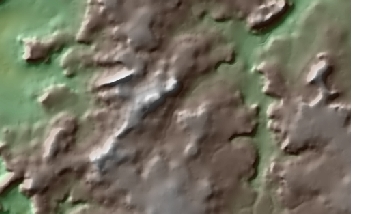
DEM (50% transparency) over hillshade
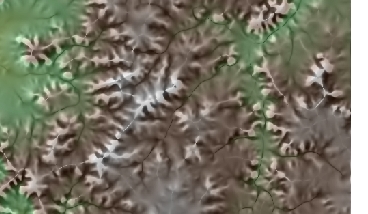
DEM (50% transparency) over Plan Curvature (20% transparency) over hillshade. Pronounced valleys and ridges.
Parameters
| Expression | Explanation |
|---|---|
| Function Name | RasterPlanCurvature |
| Function Name | RasterProfileCurvature |
| Function Name | RasterGeneralCurvature |
| <input raster> | A String representing the input raster dataset. |
| <output raster> | A String - the full name of the output raster. |
ETSPath used in the table below is the full path to ETSRun.exe (E.G. "C:\Program Files\ETSpatial Techniques\ETSurface\ETSRun.exe")
| Language | Syntax |
|---|---|
| Python | subprocess.call([ETSPath, "RasterPlanCurvature", "input raster", "output raster"]) |
| .NET using ETSRun.exe | StartInfo.FileName = ETSPath StartInfo.Arguments = "RasterPlanCurvature" "input raster" "output raster" |
| .NET using ETSOutX.dll | RasterPlanCurvature(input raster, output raster) |
| ArcPy | arcpy.RasterPlanCurvature("input raster", "output raster") |
| Language | Syntax |
|---|---|
| Python | subprocess.call([ETSPath, "RasterProfileCurvature", "input raster", "output raster"]) |
| .NET using ETSRun.exe | StartInfo.FileName = ETSPath StartInfo.Arguments = "RasterProfileCurvature" "input raster" "output raster" |
| .NET using ETSOutX.dll | RasterProfileCurvature(input raster, output raster) |
| ArcPy | arcpy.RasterProfileCurvature("input raster", "output raster") |
| Language | Syntax |
|---|---|
| Python | subprocess.call([ETSPath, "RasterGeneralCurvature", "input raster", "output raster"]) |
| .NET using ETSRun.exe | StartInfo.FileName = ETSPath StartInfo.Arguments = "RasterGeneralCurvature" "input raster" "output raster" |
| .NET using ETSOutX.dll | RasterGeneralCurvature(input raster, output raster) |
| ArcPy | arcpy.RasterGeneralCurvature("input raster", "output raster") |
Notes: