
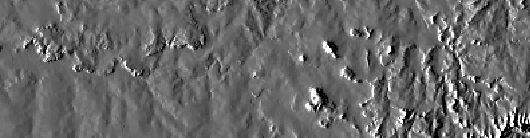
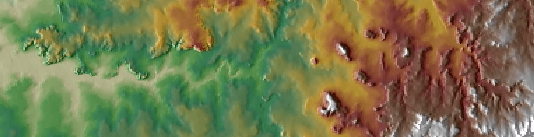
Calculates the shading of a terrain raster based on user defined position of the light source (The Sun). The position of the light source is defined with Azimuth (0 to 360) and Altitude (0 to 90). The combination of the Hillshade overlaid with a semi-transparent elevation raster gives more realistic look of the terrain (see example below). Read more about Hillshade and its importance here.
Source Elevation raster
Result Hillshade raster
Elevation raster (50% transparency) over the Hillshade raster
Parameters
| Expression | Explanation |
|---|---|
| Function Name | RasterHillshade |
| <input raster> | A String representing the input raster dataset. |
| <output raster> | A String - the full name of the output raster. |
| {Azimuth} | A Double representing azimuth of the light source (0 to 360). 0 indicates North, 90 - East, 180 - South, 270 - West (default is 315). |
| {Altitude} | A Double representing the altitude of the light source in degrees (0 to 90) (default is 45). |
ETSPath used in the table below is the full path to ETSRun.exe (E.G. "C:\Program Files\ETSpatial Techniques\ETSurface\ETSRun.exe")
| Language | Syntax |
|---|---|
| Python | subprocess.call([ETSPath, "RasterHillshade", "input raster", "output raster", "Azimuth", "Altitude"]) |
| .NET using ETSRun.exe | StartInfo.FileName = ETSPath StartInfo.Arguments = "RasterHillshade" "input raster" "output raster" "Azimuth" "Altitude" |
| .NET using ETSOutX.dll | RasterHillshade(input raster, output raster, Azimuth, Altitude) |
| ArcPy | arcpy.RasterHillshade("input raster", "output raster", "Azimuth", "Altitude") |
Notes: