Calculates the Volume and Area of a raster surface above and below a horizontal reference plane defined by the user specified level or a reference raster.
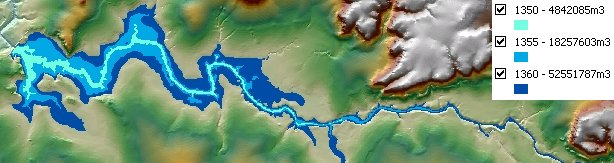
Volume for a dam calculated for three different levels - 1350, 1355 and 1360 meters. The option to calculate the volume only below the reference plane used. The result rasters converted to polygons. The polygons downstream from the dam wall removed.
Parameters
| Expression | Explanation |
|---|---|
| Function Name | RasterVolume |
| <input raster> | A String representing the input raster dataset. |
| <output raster> | A String - the full name of the output raster. |
| <Level> | A Double representing the Z level of the reference plane. |
| {VolumeOption} | A String representing the volume option. Valid values - Below - Above - Below and Above |
| {ReferenceRaster} | A String - full path to the reference raster dataset. |
ETSPath used in the table below is the full path to ETSRun.exe (E.G. "C:\Program Files\ETSpatial Techniques\ETSurface\ETSRun.exe")
| Language | Syntax |
|---|---|
| Python | subprocess.call([ETSPath, "RasterVolume", "input raster", "output raster", "Level", "VolumeOption", "ReferenceRaster"]) |
| .NET using ETSRun.exe | StartInfo.FileName = ETSPath StartInfo.Arguments = "RasterVolume" "input raster" "output raster" "Level" "VolumeOption" "ReferenceRaster" |
| .NET using ETSOutX.dll | RasterVolume(input raster, output raster, Level, VolumeOption, ReferenceRaster) |
| ArcPy | arcpy.RasterVolume("input raster", "output raster", "Level", "VolumeOption", "ReferenceRaster") |
Notes: