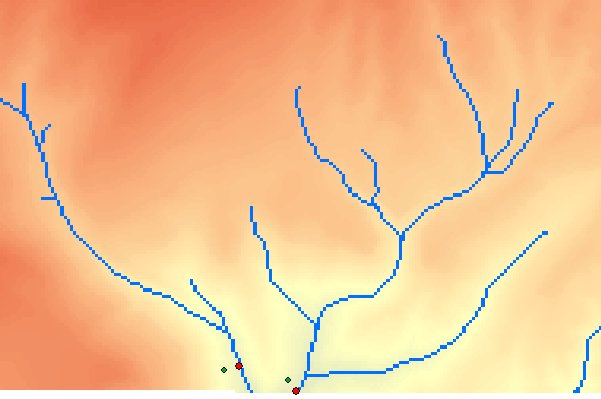
Snaps Pour points (Outlets) to raster cells within a specified distance depending on the selected Snap option.
An example of Snap Pour Points using the Stream option - initial points in green and after snapping in red.
Parameters
| Expression | Explanation |
|---|---|
| Function Name | SnapPourPoints |
| <InputPoints> | A String - full path to the Input Points dataset. |
| <OutputPoints> | A String - the full path to the output point layer. |
| <ReferenceRaster> | A String - full path to the raster to be used for snapping. |
| <SnapOption> | A String - possible values are "stream", "elevation" and "accumulation". |
| <SnapDistance> | A Double representing the Snap Distance in the units of the spatial reference of the input. |
ETSPath used in the table below is the full path to ETSRun.exe (E.G. "C:\Program Files\ETSpatial Techniques\ETSurface\ETSRun.exe")
| Language | Syntax |
|---|---|
| Python | subprocess.call([ETSPath, "SnapPourPoints", "InputPoints", "OutputPoints", "ReferenceRaster", "SnapOption", "SnapDistance"]) |
| .NET using ETSRun.exe | StartInfo.FileName = ETSPath StartInfo.Arguments = "SnapPourPoints" "InputPoints" "OutputPoints" "ReferenceRaster" "SnapOption" |
| .NET using ETSOutX.dll | SnapPourPoints(InputPoints, OutputPoints, ReferenceRaster, SnapOption, SnapDistance) |
| ArcPy | arcpy.SnapPourPoints("InputPoints", "OutputPoints", "ReferenceRaster", "SnapOption", "SnapDistance") |
Notes: