Creates Stream features and optionally Nodes features and Watershed raster from a DEM.
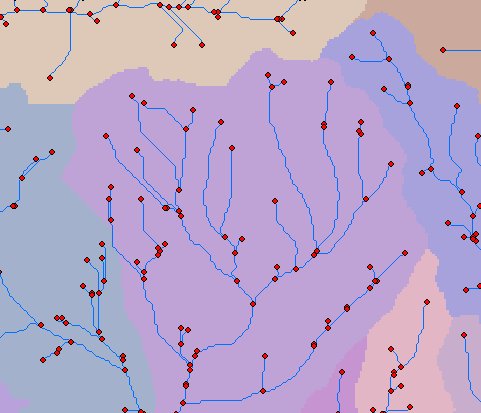
An example of Streams And Watershed output - Streams and Nodes Features and Watershed raster.
Parameters
| Expression | Explanation |
|---|---|
| Function Name | StreamsAndWatershed |
| <InputRasterDEM> | A String representing the input DEM raster dataset. |
| <OutputStreams> | A String representing the output stream layer. |
| <FlowDirectionMethod> | A String - the full name of the output stream feature layer. |
| <StreamInitiationThreshold> | A Double representing the number of Flow Accumulation cells at which a Stream is initiated. |
| {OutputNodes} | A String - the full name of the output nodes feature layer. |
| {OutputWatershed} | A String - the full name of the output watershed raster. |
ETSPath used in the table below is the full path to ETSRun.exe (E.G. "C:\Program Files\ETSpatial Techniques\ETSurface\ETSRun.exe")
| Language | Syntax |
|---|---|
| Python | subprocess.call([ETSPath, "StreamsAndWatershed", "InputRasterDEM", "OutputStreams", "FlowDirectionMethod", "StreamInitiationThreshold", "OutputNodes", "OutputWatershed"]) |
| .NET using ETSRun.exe | StartInfo.FileName = ETSPath StartInfo.Arguments = "StreamsAndWatershed" "InputRasterDEM" "OutputStreams" "FlowDirectionMethod" "StreamInitiationThreshold" "OutputNodes" "OutputWatershed" |
| .NET using ETSOutX.dll | StreamsAndWatershed(InputRasterDEM, OutputStreams, FlowDirectionMethod, StreamInitiationThreshold, OutputNodes, OutputWatershed) |
| ArcPy | arcpy.StreamsAndWatershed("InputRasterDEM", "OutputStreams", "FlowDirectionMethod", "StreamInitiationThreshold", "OutputNodes", "OutputWatershed") |
Notes: