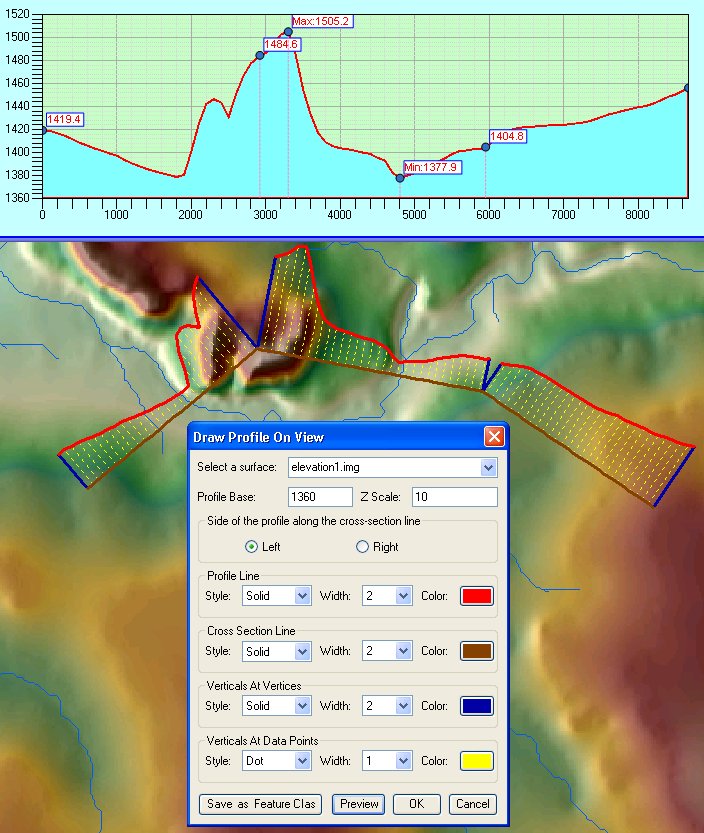
The profile currently displayed in the Profile Window can be drawn on the Data Frame (the View). This function can be accessed from Profile Menu ==> Draw Profile on View. A dialog will be presented to the user to adjust the drawing options. The user can change the Profile Base and the Z Scale. Depending on the cross-section polyline the user can select the side of the polyline on which the profile will be drawn.
Only s single surface profile can be drawn on the view. The user needs to select which surface layer is to be used.
The Preview button draws the profile elements as temporary graphics. If the user selects Cancel the graphics will be deleted. If the user clicks OK the graphics will be grouped in a single group.
The graphics can also be saved in a new feature class by selecting the "Save as Feature Class" button. This will open another dialog, in which the user can specify which elements should be saved and provide a name for the new Feature Class.
NOTE: Line styles are only valid if the line width is 1. For line width bigger than 1 a solid line will be drawn.