Several options are available for exporting the profile data:
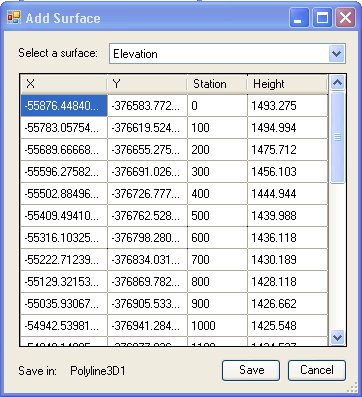
The data for a single surface can be exported only
The user needs to select a surface for which the data will be exported.
If the currently edited layer is of PointZ type and has a field called ET_Station, the stations of the data points along the profile will be stored in this field.
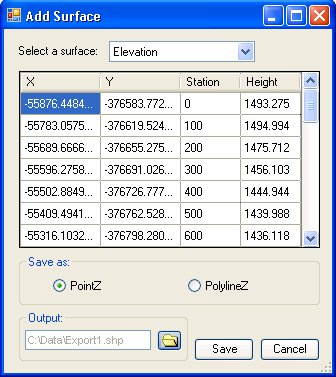
The data can be exported to a new PointZ or PolylineZ feature class.
The data for a single surface can be exported only
The user needs to select a surface for which the data will be exported.
If the output is set to PointZ type a new field called ET_Station will be created, the stations of the data points along the profile will be stored in this field.
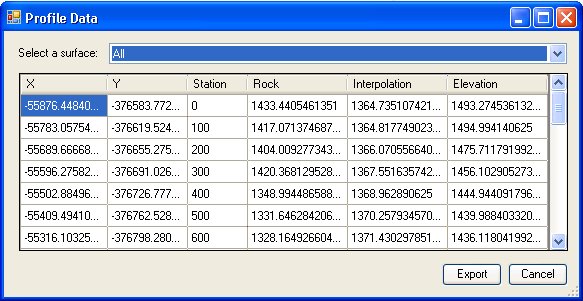
The user needs to select a surface for which the data will be exported. If the user selects "All", then the data for all surfaces in the Profile Window will be exported. Since profiles of different types may have different data points, the data points are merged and sorted, and Z values for each surface calculated for the resultant list of data points.
The data will be exported in a comma delimited text file and will have the following structure
X,Y,Station,Surface1,Surface2,Surface3.......
where Surface1 will have the Z values for the point extracted from Surface1
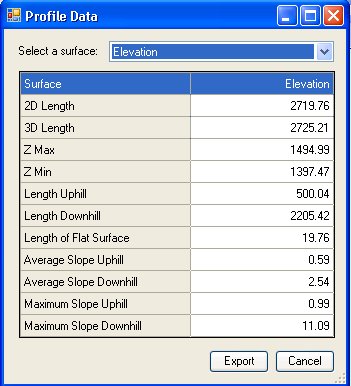
The statistics of the profile for the specified surface will be saved to a text file.