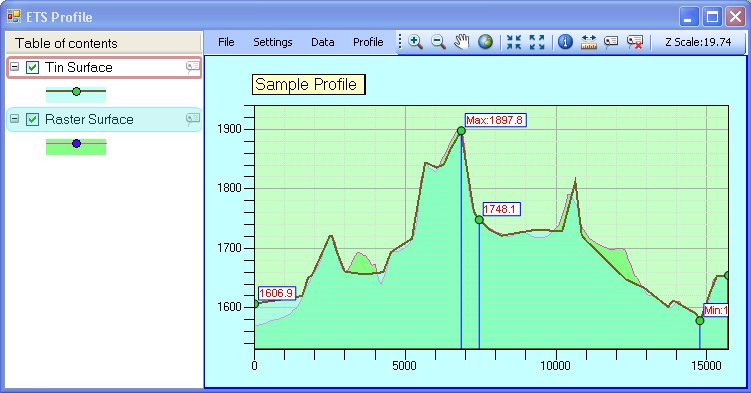
The Profile Window is the
dialog where the profiles are displayed. The user can adjust various
settings and once happy with the results, export the data or image of the
profile, draw the profile in the Data Frame or the Layout.
Functionality in the Profile window is
available through the Main Menu displayed on top of the dialog, the Main
Toolbar (next to the Main Menu) and the Context Menu for the Table of
Contents (right click on a layer name in the TOC).
Over the chart area the user can use the
mouse wheel to zoom in by turning it forward or zoom out by turning it
backward. Pressing the mouse wheel (or middle button) and moving the
mouse will pan the profile accordingly. Pressing the right mouse
button will create a tooltip displaying the Station and Height at the mouse
location. To remove the tooltip, press the right button again.
Table of contents (TOC) - located on the left side shows the
names of layers displayed in the Profile Window. The layer at the
top of the table is displayed on top in the Profile Window. From
the TOC the user can control the following:
The order in which the layers are displayed by dragging and
dropping the TOC items up and down the list
The visibility of each layer by clicking on the check box
Expand the layer by clicking on the plus/minus sign to show the
layer symbol(s)
The style for drawing the layer by opening the Properties Window
- either double click on a Layer name of right lick and select
Properties from the context menu
Show Data Points for a profile by right clicking on the Layer
name and checking the "Show Data Points" status
Set the Identity layer by selecting the "Set Identify" from the
context menu. There can be only one Identity layer in the Profile
Window. It is displayed with a brown outline in the Table of
contents.
Include or exclude the Profile in the list of layers for which labels will
be created when using the Label tool (by checking the value in the
context menu). The layers enabled for labels have a label icon
on the right hand side in the Table of contents.
Remove the Layer from the Profile Window by right click and
select "Remove layer" from the context menu
Main menu
File Menu - include the following items
Hide/Show Table of contents - hides or shows the Table of
contents
Save Project - allows the user to save the current
settings in a project file. The drawing styles for all
layers are saved as well as the general profile settings.
If a project file is used its name is displayed in the title
of the window.
Save Project As - saves the current settings in a new
project file which becomes the current project file
Open Project - opens a project file (.etprj). When the
user selects the project file, its contents are checked
against the current Map to determine the existence of layers.
A status window is displayed showing the required layers and
their availability in the Map. If all the layers in the
project file are found in the Map and comply with the
requirements, the file is loaded and applied to the current
profile polyline.
Add Surface - allows the user to add another surface layer
to the Profile Window. All surface layers, which are not
already present are included in the selection list (including
not visible layers) If all surface layers in the Map are
already present in the Profile Window, a message is displayed
to inform the user.
Add Layer - see Adding Layer options
Save profile in currently edited layer - see Export
options
Save profile in a new feature class - see Export
options
Export profile as text file - see Export options
Save as image - see Export options
Settings Menu
Profile Settings - opens the Options window allowing the
user to change general settings - Title, colours and fonts for
display of the background, grids, axis settings as well as
settings for data display
Line of sight settings - allows the user to change
settings for Line of Sight display - only available with Line
of Sight display
Sample Distance - allows the user to change the sample
distance for profile generation
Data Menu
View Profile Data - displays X, Y and Z for each data
point of a profile together with the station (distance from
the start of the cross-section polyline, along the polyline).
If multiple profiles are drawn in the Profile Window, the data
for all profiles can be displayed by selecting the "All"
option. Since profiles of different types may have
different data points, the data points are merged and sorted,
and Z values for each surface calculated for the resultant
list of data points.
View Profile Statistics - displays several important
characteristics of each profile:
3D Length
2D Length
Maximum Z value
Minimum Z value
Length Uphill
Length Downhill
Average Slope Uphill
Maximum Slope Uphill
Average Slope Downhill
Maximum Slope Downhill
Profile Menu
Add Label at Station - adds a label on the profiles at user
specified station along the cross-section polyline
Delete All Labels - removes all labels displayed on the
Profile Window
Profile Cross-sections Along Route - see Animate Profile
Draw Profile on View - see Draw on View
Draw Profile on Layout - see Draw on Layout
Tool Bar - has several tools, many of which do not need explanations
Zoom In
Zoom Out
Pan
Zoom Full Extent
Fixed Zoom In
Fixed Zoom Out
Identify - displays for the user clicked location on the profile
Z, Station and Slope for the Identity layer. A point is
drawn for the same location on the cross-section line in the Data
Frame (the View). The Identity layer can be changed by right
clicking on the layer name in the table of contents and selecting
"Set Identify".
Measure - allows measurement of horizontal or vertical
distances in the Profile Window. With the Measure tool
selected press and hold the mouse button and drag the mouse
cursor across the window. The measured distance is displayed in
the toolbar next to the Measure tool
Label - Draws a label with Z value for the profiles at user
clicked point.
Delete Label - deletes the clicked label.
Z scale indicator - displays the current Z scale - the
difference of the representation of the distances in length and
height. Z Scale = 2 for example will mean that 250 meters height
will be equal to 500 meters length on the profile display.
Initially the Z Scale is calculated automatically for best fit in
the Profile Window. The user can adjust the value of the Z Scale
at any time - see Profile Settings