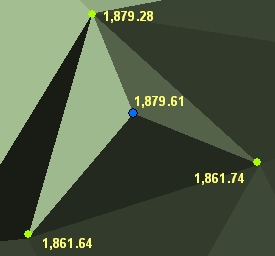
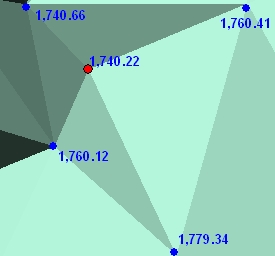
Analyses the triangles of the input TIN, finds and extracts the nodes that represent sinks (pits) or peaks to a Point dataset.
Peak node.
Sink node.
Parameters
| Expression | Explanation |
|---|---|
| Function Name | ExtractTinPeaksAndSinks |
| <input tin> | A String representing the input TIN dataset. |
| <output dataset> | A String - the full name of the output point dataset. |
| {3D features} | A Boolean indicating whether the result will be Point or PointZ. True will create PointZ features. The default is False, which will create Point features. |
| {ignore flat triangles} | A Boolean indicating whether flat triangles will be included in the analysis. The default is True - flat triangles will be excluded from analysis. |
ETGWPath used in the table below is the full path to ETGWRun.exe (E.G. "C:\Program Files\ETSpatial Techniques\ETSurface\ETSRun.exe")
| Language | Syntax |
|---|---|
| Python | subprocess.call([ETSPath, "ExtractTinPeaksAndSinks", "input tin", "output dataset", "3D features". "ignore flat triangles"]) |
| .NET using ETSRun.exe | StartInfo.FileName = ETSPath StartInfo.Arguments = "ExtractTinPeaksAndSinks" "input tin" "output dataset" "3D features" "ignore flat triangles" |
| .NET using ETSOutX.dll | ExtractTinPeaksAndSinks(input tin, output dataset, 3D features, ignore flat triangles) |
| ArcPy | arcpy.ExtractTinPeaksAndSinks("input tin", "output dataset", "3D features", "ignore flat triangles") |
Notes:
<> - required parameter
{} - optional parameter
The argument separator for StartInfo.Arguments is space. If a string might contain a space, you need to double quote it.