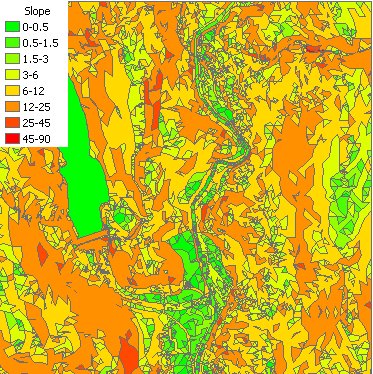
Calculates the slope of the TIN Triangles of the input TIN in percent or degrees (0 to 90). Categorizes the triangles and groups them based on the slope. The user can input a text file to be used for defining the groups to be created. If not such file is provided the default grouping will be used.
Output - default breaks in degrees:
Parameters
| Expression | Explanation |
|---|---|
| Function Name | TinSlope |
| <input tin> | A String representing the input TIN dataset. |
| <output dataset> | A String - the full name of the output polygon dataset. |
| <slope in percent> | A Boolean indicating whether the slope values will be in percent - True: in percent, False: in degrees. |
| {breaks file} | A String - the full path to the class breaks file. |
ETGWPath used in the table below is the full path to ETGWRun.exe (E.G. "C:\Program Files\ETSpatial Techniques\ETSurface\ETSRun.exe")
| Language | Syntax |
|---|---|
| Python | subprocess.call([ETSPath, "TinSlope", "input tin", "output dataset", "slope in percent", "breaks file"]) |
| .NET using ETSRun.exe | StartInfo.FileName = ETSPath StartInfo.Arguments = "TinSlope" "input tin" "output dataset" "slope in percent" "breaks file" |
| .NET using ETSOutX.dll | TinSlope(input tin, output dataset, slope in percent, breaks file) |
| ArcPy | arcpy.TinSlope("input tin", "output dataset", "slope in percent", "breaks file") |
Notes:
<> - required parameter
{} - optional parameter
The argument separator for StartInfo.Arguments is space. If a string might contain a space, you need to double quote it.