Go to ET GeoWizards 12.x User Guide
Polygon Global Snap
Go to ToolBox
Implementation
Snaps the features of a polygon layer to another layer (Point, Polyline or Polygon)
Inputs:
- A polygon layer to be snapped
- A snap layer - point, polyline or polygon
- Snap tolerance
- Snap options1 (Snap What)
- Snap options2 (Snap To What)
Outputs:
- A polygon feature class - the vertices from the source layer will be moved to snap to the
features of the Snap Layer (if within the snap tolerances
Options:
- Snap Options 1 (Snap What) - this options lets the user set which elements of the source
polylines to be used for snapping
- Vertices: All the vertices of the source polylines will be used.
- Insert Vertices: This option will get the vertices from the features of the snap layer
and will insert new vertices into the source polylines. The new vertices together with the
original ones will be used for snapping. This option is slower than the other ones, but
gives the best snapping results especially if the polylines to be snapped have much less
vertices than the ones from the Snap layer.
- Snap Options 2 (Snap To What)
- Vertices: The polygons will be snapped to the nearest vertex of the nearest feature
from the Snap layer
- Nearest edge: The polygons will be snapped to the nearest point of the nearest feature
from the Snap layer
- Vertices & Edges: If there is a vertex closer than the snap tolerance to the
polygons (their elements defined in Options 1) to be snapped, the polygon will snap to
it, otherwise it will snap to the nearest edge.
Notes:
- If the "Insert new Vertices" option is used the polygons will be cleaned
from overlaps.
- The snap distance should be in the units of the input dataset.
- The Source and the Snap datasets can have different spatial references as long as they
have the same Geographic Coordinate systems.
Example:
Before Snap |
After Snap
Option: Vertices |
After Snap
Option: Nearest Edge |
After Snap
Option: Vertices & Edges |
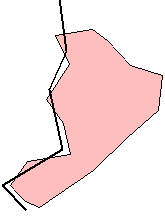
|
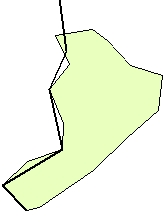
|
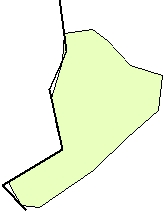
|
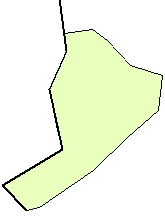
|
ToolBox
implementation
(Go to TOP)
Command line syntax
ET_GPSnapPolygons <input_dataset>
<Reference_dataset> <out_feature class> <snap_tolerance> <snap_what>
{snap_to_vertices} {snap_to_nearest}
Parameters
| Expression |
Explanation |
| <input_dataset> |
A
Polygon feature class or feature layer |
| <Reference_dataset> |
A
Point, Polyline or Polygon feature class or feature layer. |
| <out_feature_class> |
A String
- the full name of the output feature class (A feature class with the same full
name should not exist) |
| <snap_tolerance> |
A Double representing the Search
tolerance (in the units of the input_dataset) to be used |
| <snap_what> |
A
String indicating what parts of the input polylines will be snapped.
Possible values:
- Vertex: All the vertices of the
source polylines will be used.
- Insert: This option will get
the vertices from the features of the Reference_dataset
and will insert new vertices into the source polylines. The new
vertices together with the original ones will be used for snapping.
This option is slower than the other ones, but gives the best
snapping results especially if the polylines to be snapped have much
less vertices than the ones from the Reference_dataset.
|
| {snap_to_vertices} |
A
Boolean indicating whether snapping to the closest vertex of the nearest
feature from the Reference_dataset to be used |
| {snap_to_nearest} |
A
Boolean indicating whether snapping to the nearest point of the nearest
feature from the Reference_dataset to be used |
Scripting syntax
ET_GPSnapPolygons (input_dataset,
Reference_dataset, out_feature_ class, snap_tolerance,
snap_what,snap_to_vertices, snap_to_nearest)
| Copyright © Ianko Tchoukanski |