Go to ET GeoWizards 12.x User Guide
Clean Pseudo Nodes
Go to ToolBox Implementation
Combines polylines, which share a pseudo node, based on user specified attributes. The
resulting polyline data set does not contain multi-part polylines. The topology of the
data set is preserved. The function works like the UNSPLIT command of ArcEdit. The
attribute update rules include range values update
Inputs:
- A polyline feature layer
- Fields to be used for dissolving
- Update rules for the rest of the fields to be transferred
Outputs:
- An aggregated polyline feature class
- Only the polylines which share a pseudo node that have the same values for the dissolve
fields will be aggregated
- No multi-part polylines will be created.
- The attributes will be transferred according the user specified rules. For the fields
with no specified update rule, date and blob fields, the aggregated feature will carry the
attributes of the first feature.
Notes:
- The Clean Pseudo Nodes Wizard has several advantages over the dissolve function of
GeoProcessing Wizard:
- Multiple dissolve fields can be used
- Works like the UNSPLIT command of ArcEdit – Only the polylines which share a pseudo
node that have the same values for the dissolve fields will be aggregated
- It preserves the topology of the polyline layer – no regular node will be removed
as a result of the procedure. – See example
- The attribute update rules include rules to handle single and address ranges – See example
- If multi-part features are already present in the layer to be dissolved, the Clean
Pseudo Nodes Wizard will explode them first. The attributes will be distributed as
follows:
- For the fields that the user has selected SUM as an update rule, the values will be
proportionally distributed between the parts
- For the rest of the fields the attributes will be copied over.
- It is recommended the Explode Wizard to be used before dissolve in order to ensure
proper distribution of the attribute values of the numeric fields.
- If no dissolve field is selected, all the pseudo nodes will be removed without
considering the attribute values.
- Range attributes from string and numeric fields can be handled. The records that have
range values containing non numeric characters will be copied arbitrary to the resulting
features.
Example:
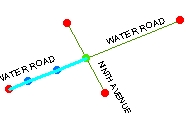
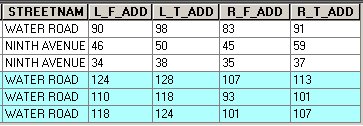
Input Layer
Dissolve field = “Streetname” |
After Dissolve:
Standard tool |
|
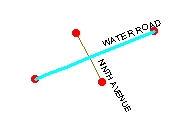 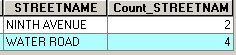
The topology is destroyed – no node in the
intersection point of the two streets |
After Clean Pseudo Nodes:
ET GeoWizards
Update rules:
L_F_ADD – Address Range –Paired field – L_T_ADD
R_F_ADD – Address Range –Paired field – R_T_ADD |
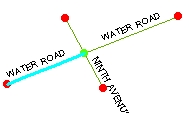 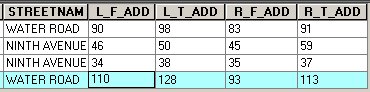 Preserved topology.
Address ranges updated correctly |
ToolBox
implementation
(Go to TOP)
Command line syntax
ET_GPCleanPseudo <input_dataset>
<out_feature class> <dissolve_field_list> {Update_Rules_List}
Parameters
| Expression |
Explanation |
| <input_dataset> |
A
Polyline feature class or feature layer |
| <out_feature class> |
A String
- the full name of the output feature class (A feature class with the same full
name should not exist) |
| {dissolve_field_list} |
A
String - a list of field names to be used for dissolving. |
| {Update_Rules_List} |
A String - a list of fields with their
update rules. |
Scripting syntax
ET_GPCleanPseudo (input_dataset, out_feature class,
"dissolve_field; dissolve_field","field update_rule; field update_rule; field
update_rule")
See the explanations above:
<> - required parameter
{} - optional parameter
Example Python
script:
import arcpy
arcpy.ImportToolbox("C:/Program Files/ET SpatialTechniques/ET GeoWizards
11.0 for ArcGIS 10.1/ET GeoWizards.tbx")
arcpy.gp.toolbox = "C:/Program Files/ET
SpatialTechniques/ET GeoWizards 11.0 for ArcGIS 10.1/ET
GeoWizards.tbx"
input_dataset = "C:\\data\\streets.shp"
result = "C:\\data\\fgdb_test.gdb\\dissolved"
arcpy.gp.ET_GPCleanPseudo (input_dataset, result,
"Name;Type", "Meters Sum; Suburb First; L_F_ADD Range Address L_T_ADD
;L_T_ADD Range Address L_F_ADD") |
| Copyright © Ianko Tchoukanski |