Go to ET GeoWizards 12.x User Guide
Polygon To Point
Go to ToolBox
Implementation
Converts a polygon data set to a point feature class
Inputs:
- A polygon feature layer
- Conversion option
- Vertices - the vertices of all polygons will be converted to points.
- Labels - the Label point is always located inside the polygon.
The algorithm makes sure that the point is not close to the boundary of
the polygon. Points created using this algorithm are suitable for
spatial transfer of attributes (See Smooth Polygons and Generalize
Polygons functions).
- Centers - the Center points represent the centroid of a polygon. Therefore
sometimes they might be located outside of the polygon
- Centers Inside - points representing the centroids of
the polygons. If the
centroid occurs outside of the polygon, the point is moved to be in the
polygon.
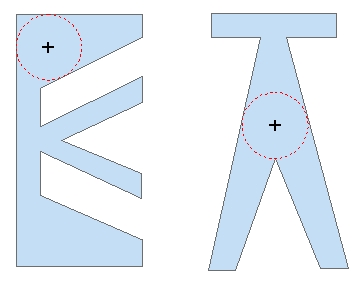
- Deepest Point - a single point per polygon is created - the inside
point farthest from the polygon boundary. The distance from the polygon
boundary is stored in the ET_Depth field of the point attribute table
- More options
- Remove Duplicate Points - the duplicate points created from the
vertices of two adjacent polygons will be represented by one point. Note
that if this option is used the attempt to convert back these points to
polygons will produce incorrect result
- Calculate point Position along boundaries
- If used the [ET_Order] field will be populated with the
relative location of the vertex (0 to 1) from the start of the
polygon boundary.
- If not used, the [ET_Order] field will be populated with the
order of the vertex in the polygon ring (from 0 to number of
vertices)
- Preserve Z(M) available only if the input feature class is of
PolygonZ(M) type. If selected, the result will be of PointZ(M) type,
otherwise the result will be of plain points (no Z or M values)
Outputs:
- New point feature class.
- All the original attributes of the
polygons are transferred to the point attribute table
- new fields are added to the
point attribute table
- [ET_Order] - the position of the point along the polygon's boundary. The value can be
from 0 to 1 (if the Calculate point Position option is used) or from
0 to number of vertices (if not). The value of this attribute can be used if the polygons have to be
recreated from these points. - only if
"Vertices" conversion option is used
- [ET_IDP] - the FID of original polygons. The values can be used to link the points back
to the polygons.
- [ET_IDR] - this is a unique number identifying each ring of the polygons. If a polygon
with FID = 356 has 3 rings, the corresponding points will have values in this fields
356_0, 356_1 and 356_2. This field can be used to recreate the polygons from the points
without loosing the rings. - only if
"Vertices" conversion option is used
- [ET_X] - the X coordinates of the
resulting points
- [ET_Y] - the Y coordinates of the
resulting points
- [ET_Z] - if the input feature class is of PolygonZ(M) type.
- [ET_M] - if the input feature class is of PolygonZ(M) type.
- [ET_DEPTH] - the distance from the deepest point to the polygon
boundary. - only if
"Deepest Point" conversion option is used
Notes :
- See above for the use of the "Remove duplicate points" option
- The functionality of the PolygonZ(M) To Point function available in the
pre 11.0 versions is entirely included in this function.
Examples:
Input
Dataset |
Result Vertices option |
Result Labels option |
|
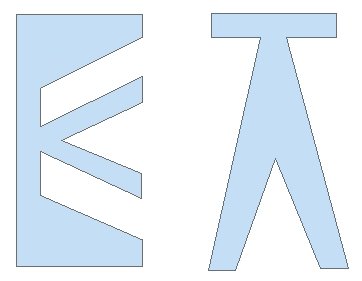
|
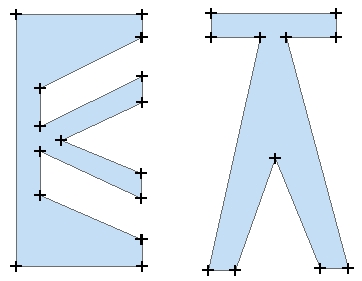 |
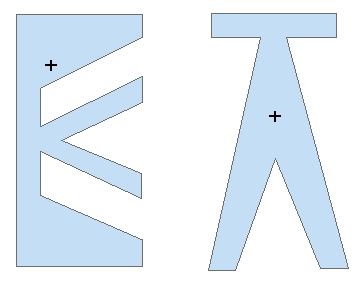 |
|
Result Center option
|
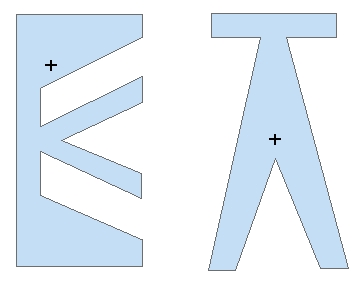
Result Center in option |
Result Deepest Point option |
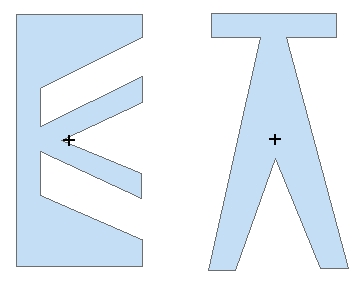 |
 |
 |
ToolBox
implementation
(Go to TOP)
Command line syntax
ET_GPPolygonToPoints <input_dataset>
<out_feature class> <Vertex | Center | Label> {remove_duplicates} {calc_point_pos} {keep_ZM}
Parameters
| Part |
Description |
| <input_dataset> |
A
Polygon feature class or feature layer |
|
<out_feature class> |
A String
- the full name of the output feature class (A feature class with the same full
name should not exist) |
| <Vertex
| Center | LabelCenterIn|DeepestPoint> |
Convert
Option. A String - the export option to
be used. The available options are (Case
sensitive):
- "Vertex" - - the vertices of all polygons will be converted to points. If
{remove_duplicates} is True the duplicate points created from the vertices
of two adjacent polygons will be represented by one point.
- "Label" - the Label point is always located inside the polygon.
The algorithm makes sure that the point is not close to the boundary
of the polygon. Points created using this algorithm are suitable for
spatial transfer of attributes (See Smooth Polygons and Generalize
Polygons functions).
- "Center" - the Center points represent the centroid of a
polygon. Therefore sometimes they might be located outside of the
polygon
- "CenterIn" - points
representing the centroids of the polygons. If the
centroid occurs outside of the polygon, the point is moved to be in the
polygon.
- "DeepestPoint - a single point per polygon - the inside point
farthest from the polygon boundary.
|
| {remove_duplicates} |
A Boolean used only with
Convert Option = "Vertex". If True the duplicate points
representing coincident vertices of two or more adjacent polygons will be
removed.
|
| {calc_point_pos} |
A Boolean indicating whether the
position of the points along the polygon boundary to be calculated (only
if the "Vertex option is used) |
| {keep_ZM} |
A Boolean indicating whether the the
output will be of Z(M) type (only if the input dataset is of Z(M) type) |
Scripting syntax
ET_GPPolygonToPoints (input_dataset,
out_feature class, convert_option, remove_duplicates,calc_point_pos, keep_ZM)
See the explanations above:
<> - required parameter
{} - optional parameter
| Copyright © Ianko Tchoukanski |