Input Dataset
Go to ET GeoWizards 12.x User Guide
Changes the directions of the polylines from a PolylineZ dataset. In the resulting feature class the polylines will be oriented Up Slope (start from the node with the lower Z value and finis at the node with higher Z value) or Down Slope (start from the node with the higher Z value and finis at the node with lower Z value)
Inputs:
Outputs:
Example:
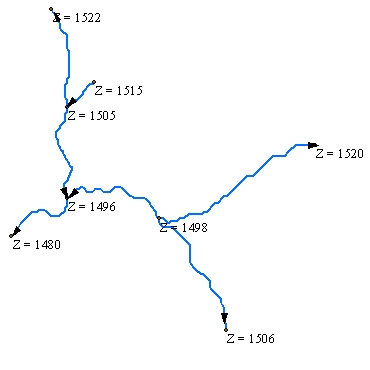
Input Dataset |
|
|
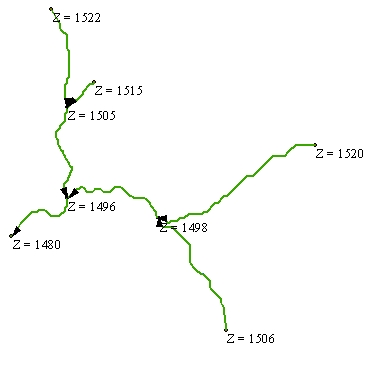
| Flipped - Down Slope option |
|
|
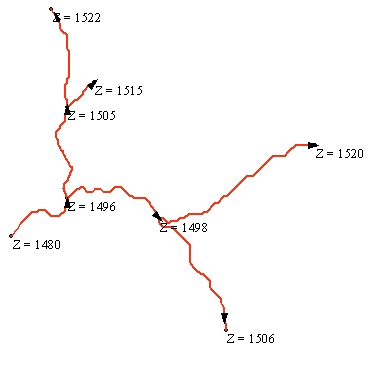
| Flipped - Up Slope option |
|
|
ToolBox
implementation
(Go to TOP)
Command line syntax
ET_GPFlipPolylineZ <input_dataset> <out_feature class> <direction>
Parameters
| Expression | Explanation |
|---|---|
| <input_dataset> | A Polyline feature class or feature layer |
| <out_feature class> | A String - the full name of the output feature class (A feature class with the same full name should not exist) |
| <direction> | A String indicating the direction of the output PolylineZs - Allowed values - "Down Slope" and "Up Slope" |
Scripting syntax
ET_GPFlipPolylineZ (input_dataset, out_feature class, direction)
See the explanations above:
<> - required parameter
{} - optional parameter
| Copyright © Ianko Tchoukanski |