Go to ET GeoWizards 12.x User Guide
Determines for each polygon of the dataset the adjacent polygons and stores the result in the attribute table as a comma delimited string.
Inputs:
Outputs:
Notes:
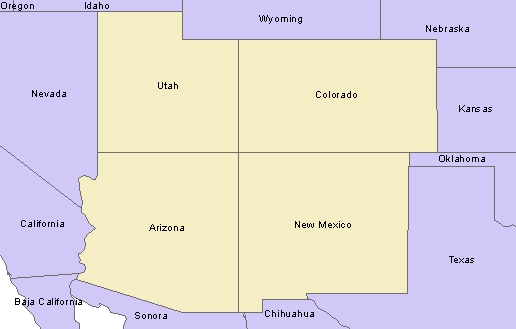
Example:
| State_Name | Do not consider Touching (in a single point) polygons neighbours. | Consider Touching (in a single point) polygons neighbours. | ||
| ET_Adj | ET_Count | ET_Adj | ET_Count | |
| Arizona | California,Sonora,Nevada,NewMexico,BajaCalifornia,Utah | 6 | California,Sonora,NewMexico,BajaCalifornia,Nevada,Utah,Colorado | 7 |
| Colorado | NewMexico,Utah,Wyoming,Kansas,Nebraska,Oklahoma | 6 | Arizona,NewMexico,Utah,Oklahoma,Wyoming,Nebraska,Kansas | 7 |
| New Mexico | Chihuahua,Sonora,Arizona,Colorado,Oklahoma,Texas | 6 | Chihuahua,Sonora,Texas,Arizona,Utah,Colorado,Oklahoma | 7 |
| Utah | Nevada,Arizona,Colorado,Wyoming,Idaho | 5 | Nevada,Arizona,Idaho,NewMexico,Colorado,Wyoming | 6 |
ToolBox
implementation
(Go to TOP)
Command line syntax
ET_GPPolygonAdjancency <input_dataset> <out_feature_class> <ID_field>{include_touching}
Parameters
| Expression | Explanation |
|---|---|
| <input_dataset> | A Point feature class or feature layer |
| <out_feature class> | A String - the full name of the output feature class (A feature class with the same full name should not exist) |
| <ID_field> | A String representing the name of a field in the in the attribute table of the input dataset field name. The field has the values used values will be used to save in the adjacency string. |
| {include_touching} | A Boolean indicating whether the polygons touching in a single point to be considered adjacent (see example above). |
Scripting syntax
ET_GPPolygonAdjancency (input_dataset, out_feature class,ID_field,include_touching)
See the explanations above:
<> - required parameter
{} - optional parameter
| Copyright © Ianko Tchoukanski |