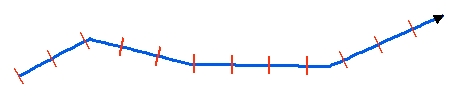
Step = 200 meters
Constant Length = 100 meters
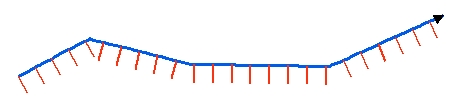
Step = 100 meters
Constant Length = 100 meters
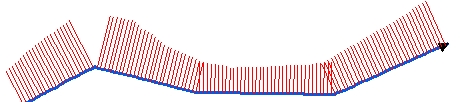
Step = 20 meters
Length from Z values
Go to ET GeoWizards 12.x User Guide
Creates equally spaced lines along the polylines from the input dataset. The station lines are single segmented polylines perpendicular to the input polylines (at the location of the station).
Inputs:
Outputs:
Notes:
|
Side = "Both" Step = 200 meters Constant Length = 100 meters |
|
Side = "Right" Step = 100 meters Constant Length = 100 meters |
|
Side = "Left" Step = 20 meters Length from Z values |
ToolBox
implementation
(Go to TOP)
Command line syntax
ET_GPStationLines<input_dataset> <out_feature class> <station_distance> <Both | Left | Right> <Constant | M Values | Z Values> {lines_length}
Parameters
| Expression | Explanation |
|---|---|
| <input_dataset> | A Polyline or Polygon feature class or feature layer |
| <out_feature class> | A String - the full name of the output feature class (A feature class with the same full name should not exist) |
| <station_distance> | A Double representing the distance (in the units of the spatial refere4nce of the input feature class) between the station lines along the input polylines |
| <Both | Left | Right> | A String representing the side of the station lines in relation to the original polylines. |
| <Constant | M Values | Z Values> | A String indicating where the length of the station lines will be taken from |
| {lines_length} | A Double representing the length (in the units of the spatial refere4nce of the input feature class) of the station lines. Used only with "Constant" option. |
Scripting syntax
ET_GPStationLines(input_dataset, out_feature class,station_distance, side, length_from, lines_length)
See the explanations above:
<> - required parameter
{} - optional parameter
| Copyright © Ianko Tchoukanski |