Go to ET GeoWizards 12.x User Guide
Builds Thiessen Polygons from a feature layer
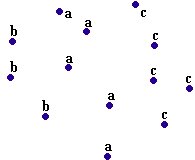
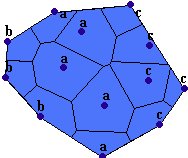
Thiessen (Voronoi) polygons define individual areas of influence around each of a set of points. Thiessen polygons are polygons whose boundaries define the area that is closest to each point relative to all other points. They are mathematically defined by the perpendicular bisectors of the lines between all points
Inputs:
Outputs:
Notes :
Examples of use:
Example:
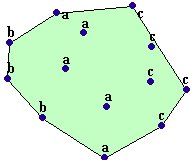
| Point Collection | Convex Hull | Thiessen Polygons |
|
|
|
ToolBox
implementation
(Go to TOP)
Command line syntax
ET_GPBuildThiessen <input_dataset> <out_feature class> {clip_buffered} {buffer_distance} {attach_attributes}
Parameters
| Expression | Explanation |
|---|---|
| <input_dataset> | A Point, Polyline or Polygon feature class or feature layer |
| <out_feature class> | A String - the full name of the output feature class (A feature class with the same full name should not exist) |
| {clip_buffered} | A Boolean indicating whether the output will be restricted to the extent rectangle of the input features (False) or will be extended with the specified buffer distance (True) |
| {buffer_distance} | A Double setting the the distance with which the extent rectangle of all the input features will be buffered (in the units of the input dataset) to be used if the {clip_buffered} is True. If {clip_buffered} is False this parameter is ignored |
| {attach_attributes} | A Boolean indicating whether the attributes of the original features will be transferred to the resulting thiessen polygons |
Scripting syntax
ET_GPBuildThiessen (input_dataset, out_feature class, clip_buffered, buffer_distance, attach_attributes)
See the explanations above:
<> - required parameter
{} - optional parameter
| Copyright © Ianko Tchoukanski |