Derives the catchment areas of the input features (Sources) using their spatial location and the weight of each source. The function allocates the cells of the output raster to the sources based on minimum cost to reach a source from the cell. The cost is calculated as distance from the cell to the source multiplied by the weight of the source. The smaller the weight value of a source is, the greater the influence of the source is.
This function produces results similar to the results from the Weighted Voronoi Diagram function. The algorithm is different and non-integer weights can be used. Since the Weighted Voronoi Diagram is much faster, the better option is to use it instead of this function unless you need to have double values for the weights.
The performance of the function depends very much on the difference between the smallest and largest weights. The larger this difference is, the slower the function will be.
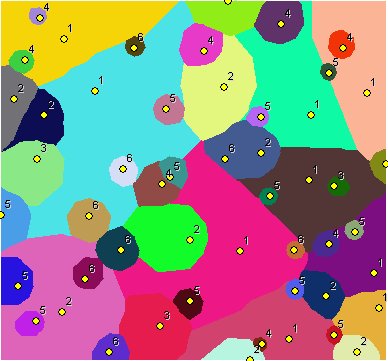
Points labeled with their weights. Integer weights used - the results very similar to the results produced by Weighted Voronoi Diagram In this case the use of Weighted Voronoi Diagram function is recommended.
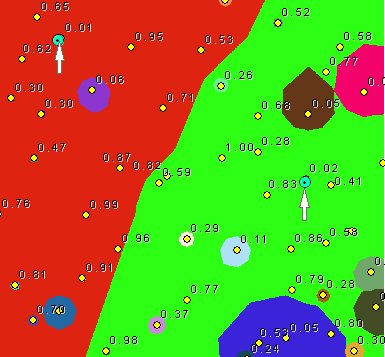
Points labeled with their weights. Double values for the weights used. The difference between the smallest weights (indicated on the image) and the largest ones close to 100 times.
Expect long processing time.
Parameters
| Expression | Explanation |
|---|---|
| Function Name | CostAllocationSource |
| <InputFeatures> | A String - the full path to the input feature dataset. |
| <output raster> | A String - the full name of the output raster. |
| <CellSize> | A Double representing the cell size of the output raster. |
| <IDField> | A String representing the name of the field in the input point feature class to be used as point ID. |
| <WeightField> | A String representing the name of the field in the input point feature class that are going to be used as weights. |
| <CutOff> | A Double representing the cut off cost - the value of the cells with larger than this cost (distance x weight) to reach will be set to NODATA. |
ETSPath used in the table below is the full path to ETSRun.exe (E.G. "C:\Program Files\ETSpatial Techniques\ETSurface\ETSRun.exe")
| Language | Syntax |
|---|---|
| Python | subprocess.call([ETSPath, "CostAllocationSource", "InputFeatures", "output raster", "CellSize", "IDField", "WeightField", "CutOff"]) |
| .NET using ETSRun.exe | StartInfo.FileName = ETSPath StartInfo.Arguments = "CostAllocationSource" "InputFeatures" "output raster" "CellSize" "IDField" "WeightField" "CutOff" |
| .NET using ETSOutX.dll | CostAllocationSource(InputFeatures, output raster, CellSize, IDField, WeightField, CutOff) |
| ArcPy | arcpy.CostAllocationSource("InputFeatures", "output raster", "CellSize", "IDField", "WeightField", "CutOff") |
Notes: