Go to ET GeoWizards 12.x User Guide
Build Polygon
Go to ToolBox
Implementation
Builds polygon feature class from a polyline layer
Inputs:
- A polyline feature layer
- Optional point dataset that represents polygon labels and is to be used
for attaching attributes to the resulting polygons.
Outputs:
- New polygon feature class
Notes :
- The process goes through several steps
- Cleans the polyline theme with user specified Fuzzy tolerance - creates intersections and removes
duplicate polylines. It is highly recommended the polyline layer to be cleaned beforehand
with the Clean Polyline Wizard.
- During the second step the process removes all non polygon elements. All the polylines
having a dangling node will be removed. Note that the function do not make an attempt to
snap the dangling nodes to the closest polylines, therefore it is very important to use Clean Dangling Nodes
function in order to be ensured that
there will be no loss of data. The process of removing non polygon elements might go
through several iterations, because in many cases removing one dangling polyline makes
another polyline dangling.
- The third step is the actual building of the polygons
- The forth step cleans the resulting polygon feature class from some minor inconsistencies
- Although not required three data preparation steps are very important as mentioned above
Example:
Source Polyline Layer |
Result Polygon Layer |
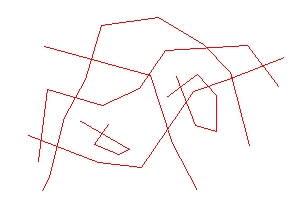
|
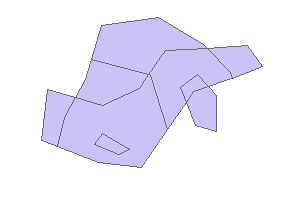 |
ToolBox implementation
(Go to TOP)
Command line syntax
ET_GPBuildPolygons <input_dataset>
<out_feature class> {clean_polylines} {fuzzy_tolerance}
Parameters
| Expression |
Explanation |
| <input_dataset> |
A
Polygon feature class or feature layer |
| <out_feature class> |
A String
- the full name of the output feature class (A feature class with the same full
name should not exist) |
| {clean_polylines} |
A Boolean indicating whether the input
polyline dataset will be cleaned before building. |
| {fuzzy_tolerance} |
A Double setting the Fuzzy tolerance
(in the units of the input dataset) to be used if the {clean_polylines}
is True. If {clean_polylines}is False this parameter is ignored |
| {label_points} |
A point feature class or feature layer
to be used as a source for the polygon attributes. |
Scripting syntax
ET_GPBuildPolygons (input_dataset, out_feature class,
clean_polylines, fuzzy_tolerance,label_points)
See the explanations above:
<> - required parameter
{} - optional parameter
| Copyright © Ianko Tchoukanski |